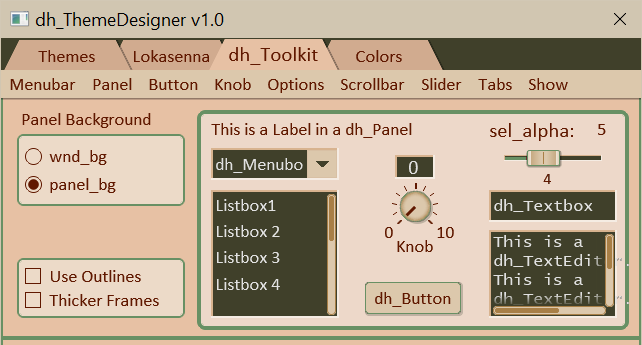
This tab displays the various dh_Toolkit defined elements (including the main top tab bar).
The menubar:
The menubar menus allow changing some of the property values
of the displayed elements. The first option shown in each menu item is the
default value. The remaining options are used to override the default.
Although this allows auditioning various colors, one should try to always
stay with the defaults or recommended alternates.
(Except, of course, where prescribed such as panel colors.)
An example:
Button -> Face color shows several options.
The button face uses the default theme color "btn_face".
There may be instances where a different value works better, such as when
placing on a panel.
As of 03-15-2026 themes include two additional colors:
'aux_bg and 'aux_text'.
This is somewhat experimental, but keeping for now. I included them
in case it may be needed in some scenario.
The "Panel Background" radio box:
Elements are placed on either the script window which uses
the GUI color "wnd_bg", or on a panel hence GUI color "panel_bg".
This radio box allows for quick switching to see how the
elements appear on the different backgrounds.
The "Use Outlines" checkbox:
Use this checkbox to specify the type of outlines to use.
The text elements, knob and slider display boxes, and slider
track normally use a highlight/lowlight frame derived from the
background color. Alternately, the frames can use a single color
outline specified the theme's 'elm_frame' color.
Check the box to use the latter. (Themes have
a false color 'metadata' which is used to specify that the GUI
is to always use the single color option.)
sel_alpha slider:
This is the only control in the Tabbed section (as opposed to
the Tools section) that has any effect on the GUI colors.
It is used to adjust the alpha value of the "sel_txt"
(selected text color used by dh_Listbox, dh_Textbox, and dh_TextEditor).
I introduced this color to give more control how the highlighted
text is displayed. Although it is probably best to try to get the
desired result by first adjusing the colors, then setting the
alpha as a last resort. A more detailed explanation can be found
in section "3.04 Colors Tab".
The Show menu:
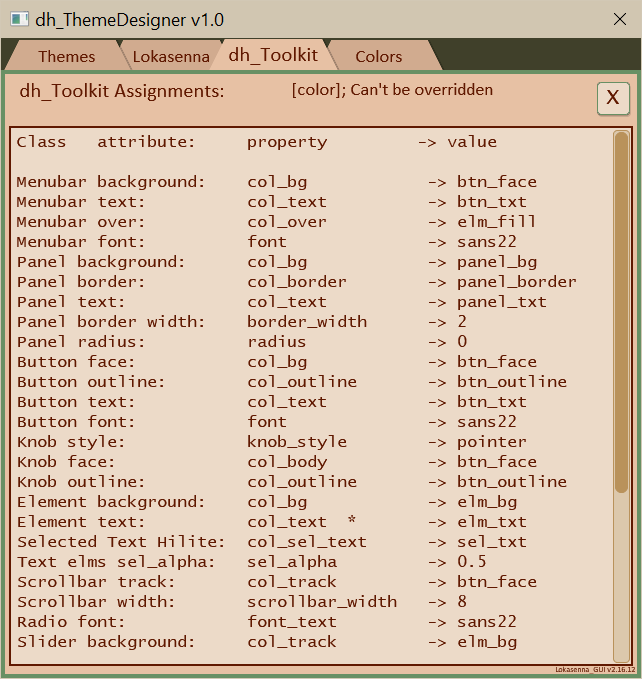
"Property Assignments to panel"
opens a panel which shows the current assigned
dh_Toolkit property values.
"Property Assignments to console"
opens the script console which shows the current assigned
dh_Toolkit property values where they can be selected
and copied if desired.
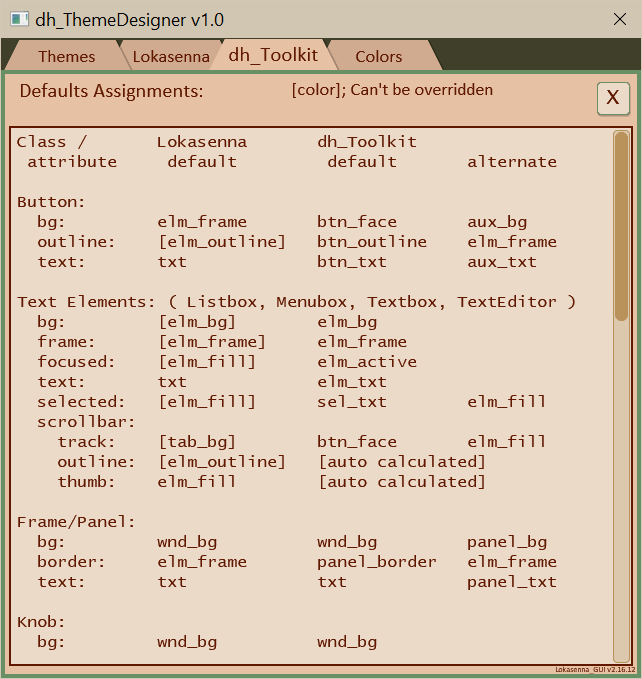
"Color Defaults to panel"
opens a panel to display a list of both Lokasenna and
dh_Toolkit elements default color values.
See image below.